
AI Content Version History for Editorial Control
AI can produce a complete draft in seconds, but publication still depends on decisions made over time. Editors need to know what changed, who approved it, which source supported a claim, and how to undo a damaging revision.
For content produced with artificial intelligence, an AI content version history gives teams a way to trace the path from generated draft to reviewed, accountable copy. But a document's revision history alone cannot explain which prompt generated a passage, why an editor accepted it, or whether a factual claim was verified.
The strongest editorial workflow connects document revisions with AI prompt and chat records, source logs, tracked changes, and approval notes. It also accounts for retention limits, because a history that disappears before a dispute or correction is resolved is not a reliable audit trail.
Key Takeaways
Use version history to compare document states, identify changes, and recover earlier content.
Use Track Changes in Microsoft Word or Suggesting mode in Google Docs to review individual edits before accepting them.
Keep AI prompt/chat logs separate from document revision history, and link related records with a shared content ID and revision reference.
Document AI-generated edits, human changes, fact checks, and approval decisions.
Understand platform-specific retention limits: Google Drive file versions, Microsoft 365 versioning, and Notion page history do not work identically.
Do not assume that a saved document, prompt history, or backup will be retained indefinitely.
For important content, export or preserve approved snapshots according to company policy and applicable legal requirements.
What AI Content Version History Actually Records
Version history tracking records saved document states. Depending on the platform, it can help editors compare versions, identify contributors, and restore a prior state. The available detail depends on the application, storage location, permissions, plan, and administrative settings.
For editorial teams, three related but different records matter.
Record | What it answers | What it cannot establish by itself |
Document revision history | What changed in the article, when, and sometimes who changed it | Which AI prompt generated the text or whether the claim is true |
Tracked changes and comments | Which additions, deletions, and proposed edits need review and why | A complete, permanent history of every document state |
AI prompt/chat history | What instructions were given to the AI and what responses were returned | Whether those responses were copied into the document or approved for publication |
These records should work together rather than substitute for one another.
Autosave is not a review record
Autosave helps prevent work from being lost when a browser closes or an application crashes. It does not necessarily explain why an edit was made or preserve a convenient, permanent record of every individual keystroke.
Version history organizes saved states into a record that can be examined later. A cloud document may save continuously while grouping changes into snapshots. Named checkpoints and editorial notes help teams identify meaningful stages, such as the first AI-assisted draft, fact-checked copy, and final approval.
Track Changes shows proposed edits
Microsoft Word's Track Changes and Google Docs' Suggesting mode display additions, deletions, and comments in the working document. They are useful when a reviewer needs to accept, reject, or discuss specific edits.
Version history operates at a broader level by preserving document states. Track Changes explains an edit on the page; version history helps recover the document as it existed at a particular stage.
Use both when a content team needs to know not only what changed, but also which proposed changes were accepted.
Build a Review Trail Before AI Text Enters the Draft
A reliable history starts before generated text is pasted into a shared document. A finished article that suddenly appears, followed by cosmetic edits, offers little context during a factual correction or approval dispute.
Create the draft in the workspace where the editorial workflow will happen. That might be Google Docs, Microsoft Word stored in OneDrive or SharePoint, or a Notion page with suitable access controls.
Set named checkpoints for editorial decisions
A useful history has recognizable stages rather than dozens of anonymous snapshots. Name or record important versions whenever the platform supports it.
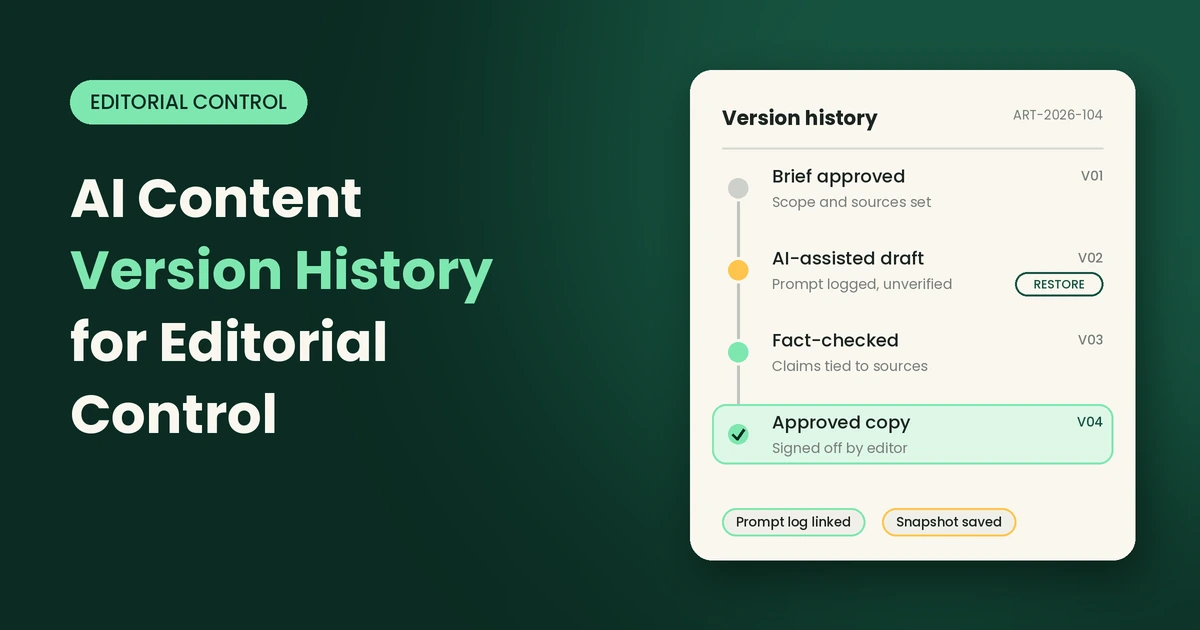
For a reported article, the checkpoints might include:
Brief approved: The assigning editor confirms the audience, scope, claims to investigate, and required sources.
AI-assisted draft: Generated text is labeled as unverified, with a reference to the relevant prompt/chat record.
Fact-checked draft: Dates, names, statistics, quotations, and material claims have been checked.
Copy-edited draft: Style, clarity, accessibility, and attribution have been reviewed.
Approved publication copy: The responsible editor signs off on the version before CMS formatting or publication.
Post-publication correction: Any material correction is documented and linked to the published article and the version that replaced it.
This sequence separates generated prose from claims that survived reporting and editing.
Keep research and attribution close to the document
Version history cannot explain why an AI system made a claim. It records the insertion, not the model's source or reasoning.
Keep source logs, interview notes, approved product documentation, and archived references beside the draft. Add comments linking consequential claims to their supporting evidence. If a citation later fails, the team can identify the affected paragraph and recover the last defensible version.
Connect AI Prompt Logs to Document Revisions
This is one of the most important distinctions in AI-assisted editing.
An AI conversation and a document revision are different artifacts. The conversation may contain a prompt, the model's response, follow-up instructions, and alternative drafts. The document history records the changes made to the article itself.
A response can be generated but never used. A generated paragraph can be heavily edited before insertion. A document can also change later without any new AI interaction.
How the two records differ
Example | AI prompt/chat record | Document revision record |
Initial generation | Records the prompt and generated draft, if the conversation is retained | May show when a block of text entered the article |
Fact-checking | May contain a request to verify a claim or rewrite it | Shows the resulting correction if it was applied |
Human editing | May not record edits made directly in Docs or Word | Shows document changes according to the platform's history behavior |
Approval | May contain discussion about a suggested revision | Should be paired with an explicit approval note or workflow record |
Rollback | The old AI response may remain in chat history | The editor restores or copies content from an earlier document version |
Neither record alone is a complete editorial audit trail.
Use a shared content ID and revision reference
Give every article or content asset a unique ID. Link the AI interaction to the specific document checkpoint that used its output.
A simple record might look like this:
Field | Example |
Content ID | ART-2026-104 |
Document | AI-Version-History-Article |
Revision checkpoint | V03 — AI-assisted draft |
AI tool and workspace | The approved tool and organizational workspace |
Prompt/chat reference | A conversation URL or internal record ID, if available |
Generated section | Introduction and first two sections |
Human changes | Replaced an unsupported claim and rewrote the introduction |
Verification | Source checked by the assigned editor |
Approval | Approved by the content lead on [date] |
The example is illustrative. Use the actual IDs and dates from your system.
Important: A conversation link is useful only while the record remains accessible to the authorized team. Where possible, retain an approved prompt-and-response excerpt in the editorial record, subject to company policy, privacy requirements, and the tool's terms. Do not copy confidential or personal information into an unapproved archive.
Record AI-generated edits explicitly
When AI helps revise an existing article, record more than the fact that AI was used.
Capture:
The section or paragraph that was changed.
The purpose of the prompt, such as shortening, restructuring, or clarifying.
The generated suggestion or a suitable reference to it.
The material changes made by the human editor.
Sources checked and claims removed or qualified.
The reviewer responsible for approval.
This does not need to become a long report for every sentence. A compact change log is usually sufficient for routine work; consequential factual, legal, health, financial, or compliance edits require more detailed evidence.
Platform Guidance: Retention, Version Limits, and Recovery
Platform settings determine how long a team can access earlier content. Managers should check these settings before choosing a system for editorial control.
The guidance below reflects official product documentation available at the time of writing, October 2026. Interfaces, plan features, and administrative policies can change, so verify the settings in your organization's own workspace before relying on them.
1. Google Docs and Google Workspace
Google Docs provides document version history through File → Version history → See version history. Editors with suitable permissions can review earlier versions, see contributor names and changes, and restore a previous state.
For Google Docs, Sheets, and Slides, revision history is different from the version management used for non-Google files uploaded to Drive.
What managers should know:
Important versions can be named to make checkpoints easier to identify.
Google Docs may group or merge revisions over time; version history should not be treated as a guaranteed record of every individual edit.
Google documents support named versions, with limits documented by Google: up to 40 named versions for a document and 15 for a spreadsheet.
For non-Google files stored in Drive, such as uploaded PDFs or DOCX files, older file versions may be deleted after 30 days or after 100 newer versions unless the version is marked Keep forever.
Google Workspace administrators may use Google Vault retention rules and holds for supported data, but these are governance and retention controls—not a promise that every revision of every file is permanently recoverable.
Recommended workflow:
Open the document and select File → Version history → See version history.
Name key checkpoints, such as AI Draft, Fact-Checked, and Approved.
For uploaded non-Google files, open Drive's version management and mark critical versions Keep forever where available.
Ask the Workspace administrator to confirm applicable Vault rules, holds, and organizational retention requirements.
Export or preserve an approved snapshot when a durable editorial record is required.
Do not assume that a general Google Drive retention policy automatically preserves every revision in the same way. Confirm the treatment of the specific file type and data involved.
Official guidance: Google Docs version history and Google Drive file versions.
2. Microsoft Word, OneDrive, and SharePoint
Microsoft Word's Track Changes is useful for reviewing individual edits, while version history for a file stored in OneDrive or SharePoint provides access to earlier file states.
For a team, the storage location matters. A local Word document does not necessarily have the same history and recovery options as a document saved in a managed OneDrive or SharePoint location.
What managers should know:
Version history is available for files stored in OneDrive or SharePoint, subject to permissions and organizational configuration.
OneDrive's general support guidance states that file version history is retained for 30 days. Work or school administrators may configure versioning differently.
SharePoint document libraries have configurable version limits. When a configured limit is reached, older versions may be deleted to accommodate newer versions.
SharePoint supports major and minor versions. Microsoft's current documentation describes a maximum of 511 minor versions per major version, while the number of major versions can be configured within supported limits.
Retention, deletion, and recovery behavior may depend on the library's versioning configuration and organizational policies.
Recommended workflow:
Store the working article in the approved OneDrive or SharePoint location.
Turn on Track Changes for a review round when individual edits need approval.
Save named or clearly labeled editorial milestones where the workflow supports them.
Ask the Microsoft 365 administrator to check the library's versioning settings and retention policies.
Confirm that version limits match the article's review cycle and any legal or compliance requirements.
Preserve an approved copy outside the rolling revision history when required by company policy.
Rollback procedure: Open the file's Version history, inspect the candidate version, and select Restore. In SharePoint, restoring a prior version creates a copy that becomes the latest version; it does not simply erase the earlier history. Verify the restored content and record why the rollback occurred.
Official guidance: Restore a previous OneDrive version and How SharePoint versioning works.
3. Notion
Notion offers page history, but the available history window depends on the plan.
According to Notion's current plan and help documentation:
Notion plan | Page history window |
Free | 7 days |
Plus | 30 days |
Business | 90 days |
Enterprise | Unlimited history window, subject to the plan's documented terms and workspace controls |
Notion records page versions periodically while users edit. Its history view highlights changes, including text edits and blocks added or deleted, but it does not necessarily capture every single change.
What managers should know:
A page's history is accessed from the page menu through Version history.
Users generally need at least Can edit access to view page history.
The Free, Plus, and Business plans have shorter recovery windows. If an important revision falls outside the plan's history window, it may no longer be available through normal page history.
Notion's Enterprise offering provides an unlimited page-history window, according to its published plan comparison; teams should still review workspace-specific retention and contractual settings.
Page history is not the same as a permanent external archive or a complete AI prompt log.
Recommended workflow:
Create a page for each article and include its content ID, owner, and approval status.
Add a source log and AI interaction references to the page.
Use dated editorial checkpoints in the page or linked database.
Export important approved content to an authorized archive when the retention period is too short for the team's needs.
Test restoring a page before relying on the process for a critical publication.
Rollback procedure: Open the page menu, select Version history, inspect the earlier state, and restore the version or copy only the blocks needed into the current page. For database pages, verify the database properties and page content separately; restoring a database does not necessarily restore every nested page's text.
Official guidance: Notion page history and restoration and Notion plan comparison.
AI Prompt and Chat Retention: ChatGPT Enterprise and Claude
Document history and AI chat history are controlled separately. An organization may preserve a Word document for years while the conversation that generated its first draft follows a shorter retention policy. The reverse can also happen.
ChatGPT Enterprise
ChatGPT conversation history and document revision history are separate records.
OpenAI's enterprise privacy guidance states that workspace administrators control retention for ChatGPT Enterprise data. Saved conversations generally remain available until deleted or removed under an applicable workspace retention policy; deleted conversations are scheduled for permanent deletion within 30 days, subject to legal, security, and other published exceptions.
Managers should not assume that a conversation will remain available forever. They should confirm the current workspace retention settings and the rules that apply to chats, uploaded files, and saved project or Library content.
Recommended practice: Record the conversation reference alongside the document revision, then preserve an approved prompt-and-response excerpt or other compliant audit record when company policy requires long-term traceability.
Official guidance: OpenAI enterprise privacy and retention and Chat and file retention in ChatGPT.
Claude Team and Enterprise
Claude for Work maintains prompt and conversation history in the product, but that does not make it the same record as the revision history of a document edited elsewhere.
Anthropic's published guidance says Enterprise customers can configure custom retention periods for organizational data. The documented minimum for the Enterprise custom-retention feature is 30 days. The settings apply to specified chats, projects, and artifacts, with retention behavior differing according to the type of record and activity.
Projects require special attention: their retention behavior can differ from standalone chats. Managers should review the applicable project and artifact rules rather than assume that a chat's retention setting covers everything associated with it.
Recommended practice: Capture a reference to the relevant Claude conversation and link it to the document checkpoint that used its output. If the conversation is needed for audit purposes, determine whether the workspace policy allows an appropriate retained record before the conversation reaches its deletion date.
Official guidance: Claude Enterprise data retention controls and Claude for Work data deletion.
When Do Version Logs Automatically Disappear?
There is no single retention period for all editorial records. Some platforms use a rolling time window, some remove the oldest versions after a configured count is reached, and some allow administrators to configure retention rules.
Record type | What may cause loss of access | Manager's action |
Google Docs revisions | Revisions may be grouped or merged over time; access depends on permissions and platform behavior | Name key checkpoints and preserve approved snapshots |
Uploaded files in Google Drive | Older versions may be removed after 30 days or 100 newer versions unless kept forever | Mark critical versions Keep forever where available |
Microsoft 365 version history | OneDrive's general guidance gives a 30-day window; SharePoint may delete versions when configured limits are reached | Review OneDrive and SharePoint settings with the administrator |
Notion page history | Free: 7 days; Plus: 30 days; Business: 90 days; Enterprise: unlimited history window | Match the plan to the required recovery period and export key milestones |
ChatGPT Enterprise conversations | Workspace retention policy or deletion can make conversations unavailable | Confirm workspace policy and preserve approved audit references |
Claude Enterprise chats and projects | Configured retention periods can delete eligible data | Confirm separate rules for chats, projects, and artifacts |
These are not interchangeable guarantees. A platform's ability to restore a document does not necessarily mean the original prompt, uploaded source, comment, or audit event will also be available.
For regulated, contractual, or legally sensitive content, ask the responsible administrator or legal compliance team to verify the actual policy. Do not treat this article as a substitute for your organization's retention schedule.
Compare Revisions Before Approving Them
Version history is most useful when editors compare meaning, not just sentence structure. A polished AI rewrite can change the scope of a claim, remove a qualification, or turn a tentative finding into a definitive statement.
Consider this example:
Earlier wording: "The pilot reduced processing time in two departments during the test period."
AI-assisted revision: "The system reduces processing time across the organization."
The second sentence expands the scope from two departments to the whole organization and changes a result observed during a pilot into a general claim.
A reviewer should check:
Did the revision change the meaning or scope?
Does the evidence support the new wording?
Did the edit remove a date, caveat, or limitation?
Did a paraphrase become too close to a source's distinctive wording?
Was an important attribution removed?
Does the revised passage still reflect the author's intended meaning?
This paragraph-level review helps detect factual drift, citation loss, and unsupported claims that can hide inside fluent prose.
Roll Back Problematic AI Edits Without Losing Good Work
A poor AI edit can flatten an expert's voice, introduce invented facts, or remove a legal disclaimer. Restoring an earlier version can be safer than reconstructing the passage from memory, but a full document rollback may also remove valid work added later.
A safe rollback procedure
Pause publication. Do not continue editing the affected passage until the problem is understood.
Identify the last defensible version. Check the document history and relevant prompt/chat reference.
Save the current state. Name it, export a copy, or follow the platform's approved preservation process.
Compare the affected section. Identify exactly which text, source, or qualification needs recovery.
Restore selectively where possible. Copy the correct passage into the current draft rather than reverting the entire document unnecessarily.
Verify the restored content. Recheck citations, links, dates, formatting, and changes made after the earlier version.
Document the decision. Add a comment or change-log entry explaining what was rolled back, why, and who approved the correction.
Update linked records. Link the correction to the relevant AI interaction, source evidence, and publication checkpoint.
For a whole document rollback, preserve the current version first. After restoration, confirm that the intended version is current and that no approved changes have been lost.
Record Corrections Where They Happen
When a factual change affects the article's premise, editors should leave a brief comment explaining the correction and linking to the supporting source. The comment need not become a public annotation; it creates an internal connection between the sentence and the verification work.
For example an AI draft may state that a product is "the market leader." An editor should replace the phrase with a measurable, supportable claim, cite an appropriate source, and label the fact-checked version.
Attribution deserves the same care. Quotes, translated passages, statistics, and borrowed frameworks should retain their source information through each revision. A version timeline may show when a credit disappeared, but deliberate review is what prevents the loss.
Collaboration Records Need Permissions and Boundaries
A detailed history can become sensitive. It may expose early client language, unannounced strategy, legal concerns, or incomplete employee work. Access should follow the same principle as other editorial records: only people with a legitimate role should see them.
Shared accounts weaken accountability because a platform may identify the account rather than the individual at the keyboard. Individual logins, clear document ownership, and defined approval roles make the timeline more useful.
Managers should also define what can be stored in AI prompts and chat logs. Confidential client information, personal data, unpublished strategy, and restricted source material should not be pasted into unapproved AI tools or exported into unrestricted archives.
A Practical Editorial Version-Control Checklist
Before approving an AI-assisted article, confirm the following:
The article has a unique content ID and a named owner.
The brief AI-assisted draft, fact-checked copy, and approved copy are identifiable checkpoints.
The relevant AI prompt/chat record is linked to the document revision that used its output.
Material AI-generated changes and human edits are documented.
Track Changes or Suggesting mode was used where individual edits needed review.
Important claims, quotes, statistics, dates, and links have supporting sources.
The final version has an explicit human approval record.
The team has verified platform permissions, retention settings, and version limits.
A rollback procedure has been tested and includes preserving the current state.
Approved versions and necessary audit records are preserved according to company policy.
Sensitive data is handled only through approved systems.
A correction path exists for problems discovered after publication.
Frequently Asked Questions
What does AI content version history show?
It records saved document states, dates, contributors, changes, and in many platforms the ability to restore an earlier version. It shows how a document developed, but it does not establish whether claims are accurate or who authored a passage.
Can document version history prove that AI wrote a passage?
No. A large pasted block or timestamp may prompt review, but it cannot distinguish generated text from copied material, offline writing, or a human draft. The AI conversation, source record, and human review provide additional context, but none should be treated as automatic proof of authorship.
Are AI chat logs the same as document revisions?
No. Chat logs record prompts and model responses within an AI tool. Document revisions record changes to the working file. A generated paragraph may never be used, and human edits may happen without any further AI interaction. Teams should link the two records using a shared content ID, revision checkpoint, and conversation reference.
How can managers avoid losing important history?
They should review the retention settings and version limits of every platform in the workflow, name important checkpoints, and preserve approved copies where required. They should also check the AI tool's chat and file retention rules, because these may differ from the document platform's settings.
How should editors restore an earlier version safely?
Preserve the current version first, identify the last defensible state, and restore only the affected material when possible. Recheck sources and subsequent edits, then document the rollback and update linked audit records.
Conclusion
AI-generated prose can enter a document at any stage. What matters is the record of human judgment that follows: verification, attribution, revision, approval, and recovery.
A reliable AI content version history connects document revisions with AI prompt/chat records, tracked changes, source evidence, and approval decisions. It also accounts for platform retention limits, so managers do not mistake temporary access to an old draft for permanent preservation.
Version history is an editorial safeguard, not an authorship detector. When teams connect their records, verify retention settings, and practice safe rollback procedures, they can correct mistakes while preserving the reasoning behind the final copy.